Four suggestions, one set of rules
An increase, a hold, a lighter weight and a lighter restart after time away, each with the reason behind it.
Last verified against the shipping engine: 2026-10-20
What Kaltro checks before each lift
Before each lift, Kaltro checks your recent sessions of that lift and, once it has enough of them, suggests whether to add weight, hold, or go lighter — with its reason on the card or one tap away. The rules are deterministic and run on your iPhone, and no language model writes the weight it suggests or the reason behind it. You decide: apply, adjust or dismiss.
The four outcomes:
When the weight goes up
You hit the top of your rep range at an effort you could repeat. Kaltro suggests the next step, and it waits for you to tap Apply. After an increase, the reps drop back toward the bottom of your range, and you build back to the top at the new weight. Tap the info button on a suggested change to see the rule behind it and the numbers it used.
Before it suggests more weight, every working set in your last session has to reach the top of its range, you have to repeat that for the number of sessions your experience level typically calls for, and the effort you logged — if you log it — can’t have run too high. The step is the smallest one your equipment allows, with a cap on its size. When even that step is too big — or it would pass the heaviest load you have told Kaltro you own for that equipment — Kaltro adds reps first, then offers a harder variation when one is ready, or an extra set if it isn’t or you turn it down, and, at the very top of that ladder, one step up with the reps reset — never past the heaviest load you have told Kaltro you own. The climb back after a break works differently, with its own targets and step sizes — see when you come back after time away.
Not convinced? Quiet it, and Kaltro suggests it again when your numbers change. Deloads and any suggestion that lowers the weight can’t be quieted.
The gates, the consistency count and the size of the step are on how Kaltro decides when to add weight.
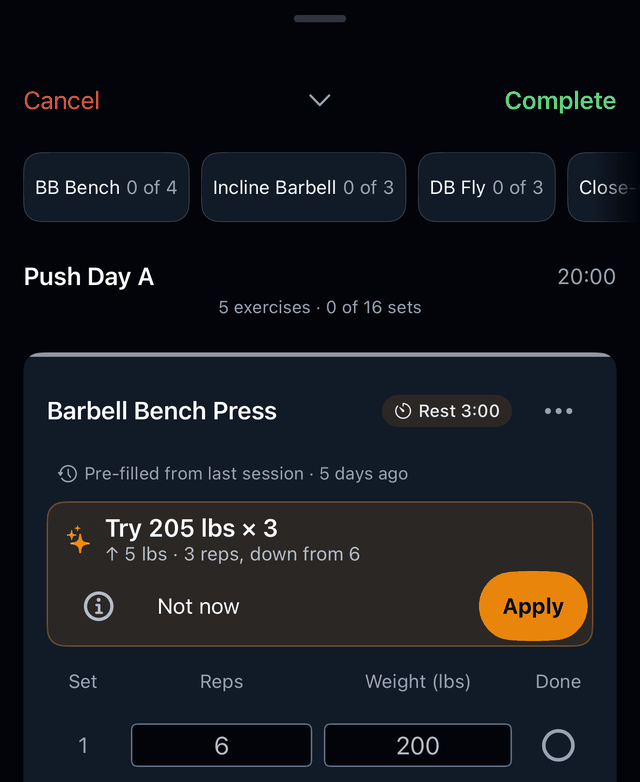
- The suggested weight and reps for your next set.
- What changes from last session: the step up in weight, and the reps reset toward the bottom of your range.
- Apply, or Not now. A suggested increase reaches your sets only when you tap Apply.
- The info button (Show Reasoning), which opens the rule behind this suggested change and the numbers it used.
When the weight holds
Your reps or effort say not yet. Kaltro suggests holding your current weight and prints why. The weight is already filled in.
Most holds have one of three causes: a working set fell short of the top of its range, the effort you logged ran above your ceiling, or Kaltro is still counting the sessions at that weight it needs before the weight moves.
Each of those gates is explained on how Kaltro decides when to add weight.
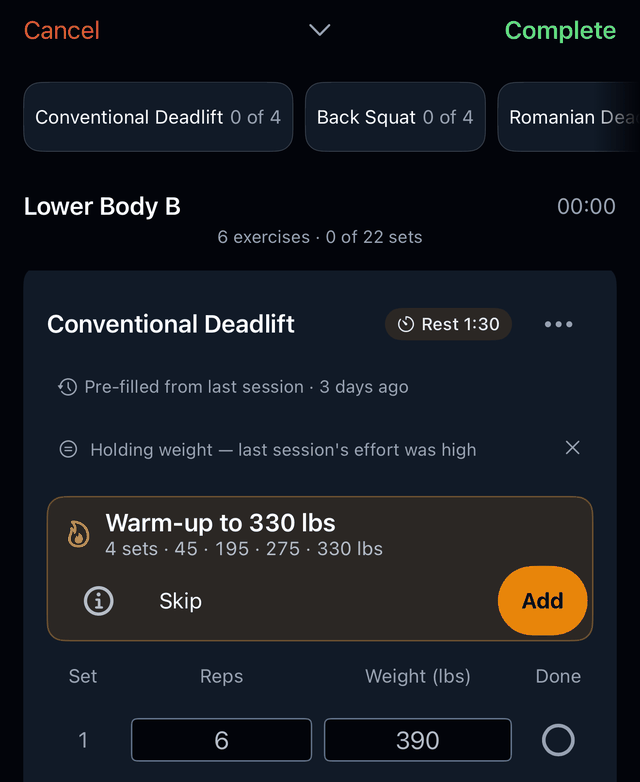
- Your current weight, already filled in for today’s sets.
- The reason it holds — which gate is not met yet.
When the weight comes down
Your reps have slid at the same weight, or your effort has stayed high. Kaltro counts logged reps and effort — it measures nothing about your body — and fills in a lighter weight with the numbers behind it. One tap on Use puts back the numbers your sets held before, for this workout. Suggestions that lower the weight are never paywalled.
The cut is modest and rounded down to a weight you can actually load. If rounding would erase it, Kaltro holds your weight instead of pretending to change it. One high-effort session on its own only holds your weight — a lighter weight from effort takes more than one high-effort session in a row. A drop in reps is compared like for like, against your recent sessions at the same weight.
The triggers and the size of the cut are on when Kaltro calls a deload.
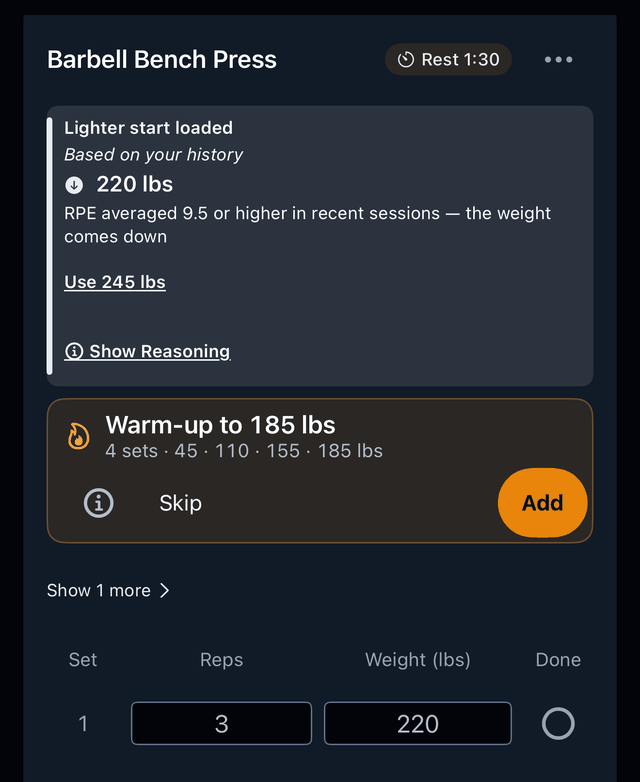
- The lighter weight, already filled in for today’s sets.
- The reason, printed under the number — the effort you logged stayed high across recent sessions.
- Use, with last session’s weight on the button, which puts your sets back to what they held before the lighter weight was loaded.
- Show Reasoning, which opens the rule behind this suggested change and the numbers it used.
When you come back after time away
You’ve been away from a lift. Kaltro suggests restarting lighter, even before it has its usual history. How much lighter depends on how long you were away and your experience level — the steps are on the deload methodology page.
On bar-loaded lifts the restart never goes below the empty bar, and bodyweight lifts with nothing added are held at last session’s reps rather than made easier. From there, the normal rules resume. A lighter restart after time away is never paywalled.
Why Kaltro can speak up here before it has its usual history: how much history Kaltro needs first.
After a shorter break there is one more stage before the normal rules: Kaltro climbs back toward a weight your log shows you held before the break, one capped step per session that meets its target, and never past that weight or the heaviest load you have told Kaltro you own, whichever is lower. The details are on the progression methodology page.
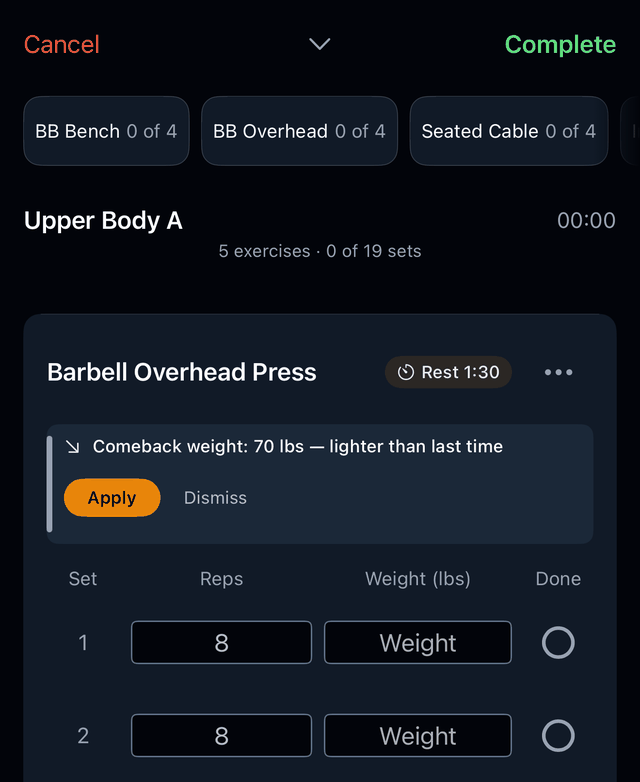
- The restart weight Kaltro suggests.
- Labelled as a comeback weight — a starting point after time away.
- Apply it or dismiss it; the choice stays yours.
Read the rules in full
The thresholds behind these four outcomes are quoted from the shipping engine on the methodology pages: how Kaltro decides when to add weight, when it calls a deload and how much history it needs first. The rest of the app is on the features page.
Holds, lighter weights and a lighter restart are free with or without Pro; for the rest, see pricing.
For what Kaltro costs, and what stays free, see Kaltro pricing.
Train with proof.
Kaltro is not on the App Store yet. Ask for TestFlight access and see the reasoning on your own lifts.
Or email feedback@kaltro.fit — we add testers by hand.